Showing posts with label data privacy. Show all posts

Tuesday, July 17, 2018

Sun, Sand, and Cybersecurity


From the desk of Thomas F. Duffy, MS-ISAC Chair
This month, in partnership with the National Cyber Security Alliance, we aim to provide some valuable tips on staying cyber safe while heading on a summer vacation. Whether you are out exploring or relaxing, it is important to strive to be as secure as possible with your digital devices and information. Unfortunately, travel can open you up to different points of vulnerability compared to normal everyday use at home, and we don’t just mean accidentally going swimming with your cell phone. You see, while traveling you are operating outside of your normal, safe routines. This means using your devices on different networks and putting them down in different locations, including under your beach towel while swimming. By following some smart practices, you can connect with greater confidence during a summer escape.

Getting Ready to Go:

Avoid mayhem and make magical family memories by taking a few simple cyber safety steps before you head out of town. The goal here is to prepare your devices for travel and to keep them from being used against you.
  • Keep a clean machine: Before you hit the road, make sure all security and critical software is up-to-date on your mobile devices and keep them updated during travel. These protections are your best line of defense against viruses and malware.
  • Lock down your login: Your usernames and passwords are not enough to protect key accounts like those you use for email, banking, and social media. Fortify your online security by turning on multi-factor authentication, commonly referred to as two-factor authentication, when available. This typically pairs your username and password (i.e. something you know) with a message sent to your phone (i.e. something you have) or your fingerprint (i.e. something you are).
  • Password protect: Use a passcode or security feature like a finger swipe pattern or fingerprint to lock your mobile device. Also set your screen to lock after a short period of time by default. If you do choose to use a finger swipe, make sure it has at least one turn (preferably two) and that a pin code has at least 6 numbers!
  • Think before you use that app: New apps are tempting! It is important to always download new apps from only trusted sources like the Apple App Store or the Google Play Store. Additionally, consider limiting your apps access to services on your device, like location services.
  • Own your online presence: Set the privacy and security settings on social media accounts, web services, and devices. It is okay to limit how and with whom you share information – especially when you are away.

While on the Go:

Once you and your gang are at your destination, you are in new territory and are facing new potential cyber threats. Here are some ways you can keep up secure practices while out and about.
  • Get savvy about what you do on other peoples’ Wi-Fi and systems: Do not transmit personal info or make purchases on unsecure or public networks. Instead, use your phone carrier internet service for these needs. For laptops/tablets, it is easy to use your phone as a personal hotspot to surf more securely using carrier data. Also, never use a public computer or device to shop, log in to accounts, or do anything personal.
  • Turn off Wi-Fi and Bluetooth when idle: When Wi-Fi and Bluetooth are on, they may connect and track your whereabouts. Only enable Wi-Fi and Bluetooth when required, and disable your Wi-Fi auto-connect features.
  • Protect your $$$: Be sure to shop or bank only on secure sites. Web addresses with ‘https://’ and a lock icon indicate that the website takes extra security measures. However, an “http://” address indicates your connection is not secure (not encrypted) and you should not transmit payment or sensitive information over to such a site.
  • Share with care: Think twice before posting pictures that signal you are out of town. Knowing you are away from home is a great piece of information for a criminal to have and they may target your home for physical crime. Also consider limiting your social media apps’ access to location services on your device, and omit location information while making your posts and sharing your pictures.
  • Keep an eye on your devices: Laptops, smartphones, and tablets are all portable and convenient, making them perfect for a thief to carry away! Keep your devices close to you and hold onto them if strangers approach you to talk, as a common scam consists of a stranger distracting you and placing a map or newspaper over your device and walking away with it when finished talking.
  • Know your destination’s laws: If you are heading out of the country, check up on any specific laws on internet and device usage. Additionally, bring as few devices as possible and consider using a device specifically purchased for international travel.
Armed with these tips and practices, you should have a happy and cyber safe vacation ahead of you. To learn more about staying cyber safe and secure while travelling, head to the MS-ISAC’s Security Primer covering this topic. For more information on NCSA, including countless resources on staying cyber secure, please visit staysafeonline.org.

Tuesday, January 9, 2018

January 1 - April 15 is Phishing Season

While phishing attacks can occur at any time, there is an increase in attacks between January 1 and April 15. As a reminder, phishing is a tactic designed to steal personal data (think passwords, credit card numbers, banking information, etc) and/or install malware on your computer. Phishing attacks come in many forms. Emails that impersonate popular companies and services (banks, dropbox, Google, etc) are most common. Spear-phishing occurs when attackers send emails that appear to come from your trusted contacts, such as, coworkers, friends, etc. Attacks may also make phone calls impersonating others and use other methods to obtain your personal information.

Check out the following tips to avoid falling victim to phishing scams:

Be Skeptical
If something seems suspicious, use caution. Typos, too many exclamation points, and other grammatical flags can be used to question the legitimacy of emails. 

Check the sender's address. Don't trust the display name alone: hover over the display to see the full email address. Does it match other communications from the organization?

You can also hover your mouse over any links embedded in the body of the email. If the link address looks weird, don’t click on it. If you want to test the link, open a new window and type in website address directly rather than clicking on the link from unsolicited emails. 

Is the email addressed "Dear Customer" or with another generic salutation? If so, be cautious —legitimate business emails will often personalize their greetings with your name.

Legitimate banks and companies will never ask for personal credentials via email or phone. Don’t give them up.

Invoking a sense of urgency or fear is a common phishing tactic. Beware of subject lines that claim your “account has been suspended” or your account had an “unauthorized login attempt.” Urgent language is designed to make you act before thinking.

Lack of details about the signer or how you can contact a company strongly suggests a phish. Most companies have an official signature.

Including malicious attachments that contain viruses and malware is a common phishing tactic. Malware can damage files on your computer, steal your passwords or spy on you without your knowledge. Don’t open any email attachments you weren’t expecting.

Phishers are extremely good at what they do. Just because an email has convincing brand logos, language, and a seemingly valid email address, does not mean that it’s legitimate. Be skeptical when it comes to your email messages—if it looks even remotely suspicious, don’t open it.


Choose Strong Passwords and Keep them Secure
One of the best ways to protect against phishing attacks is to use secure password management strategies. Passwords should be unique for each of your logins, with master passwords like your district synced credentials, being the strongest and most secure. While tempting to select passwords based on personal information is tempting, these passwords are often also the least secure and easy for others to guess. Examples: favorite sports team, family names, pet names, etc. The most secure passwords contain a random string of words. Passwords are also only as secure as how you store them. If you must write them down to remember them, make sure they are stored in a secure location--not on your monitor, under keyboard, etc. 

Password Resources:
  • Take the password quiz Carnegie Mellon University designed to assess your perceptions of secure passwords. 
  • Last Pass is a password manager that allows you to set one secure password to manage randomly generated passwords for the websites you visit.
  • Password Alert gives you a warning when it detects you reusing passwords across sites.
  • How Secure is My Password estimates how long it would take for someone to hack your password.
Use 2-Factor Authentication
To keep your district accounts secure, I highly recommend enabling 2-Step Verification to protect your account credentials. Since we sync your passwords across multiple websites and applications, it is critical that we all do our part to protect our accounts. This extra step does not take much additional time and keeps bad guys out even if they are able to obtain your password. Information about how it works and a link to step by step directions follow. 


Tuesday, November 28, 2017

Best Practices for Sharing Google Docs

Link-Based Sharing vs. Invite-Based Sharing


Link-Based Sharing
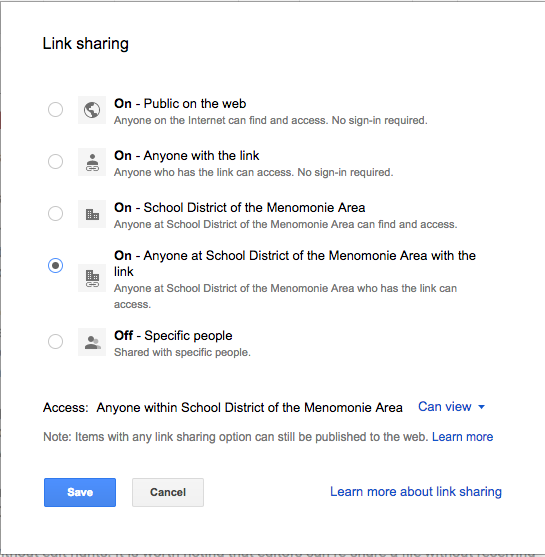
Selecting the default “get shareable link” option gives access to  the file with everyone in our SDMA domain including students. You can also share files outside our domain by choosing “anyone with the link” or “public on the web.”  While you may only publicize the link with your intended audience, your file is still searchable.

Link-based sharing is a quick and easy way to circulate documents in your Drive. Consequently, it also poses the greatest security risk to our data if misused or misunderstood because it often results in unintentional sharing of confidential or sensitive information internally.

Invite-Based Sharing
Alternatively, the most secure way to disseminate file access is by invite. This selection requires you to type in the name or email address of those with whom you wish to share the file. This requires the recipients to be signed-in to their appropriate Google account to view or edit the shared document. To make this process more convenient, you may type in existing Google Groups. Typing in “High School Staff,” for example, will quickly share your document with everyone in that email group. For sensitive data, invite-based sharing either individually or by Group is highly encouraged in lieu of link-based sharing options. Additionally, by clicking “Advanced,” you receive the options to “Prevent editors from changing access and adding new people” and “Disable options to download, print, and copy for commenters and viewers.” These features further ensure that you retain control of your most sensitive data.